Feeling overwhelmed by repetitive tasks and clunky processes? AI workflow tools are changing the game—automating what used to take hours into just minutes. Whether you’re running a business or managing a team, these tools can streamline your daily operations effortlessly. In this article, we explore the best AI workflow tools to help you boost productivity, reduce errors, and stay focused on what truly matters.
What Are AI Workflow Tools and Why They Matter
AI workflow tools are advanced software platforms that combine automation with artificial intelligence to simplify, accelerate, and improve everyday business tasks. These tools replace repetitive manual efforts with intelligent systems that can make decisions, follow logical processes, and scale operations without constant human input. Whether it’s automating approvals, syncing databases, or generating content, AI workflow tools offer a smarter way to get things done—more efficiently and accurately.
The Rising Demand for Workflow Automation
The demand for workflow automation has surged, especially in the wake of digital transformation and remote work. Businesses today must operate faster, leaner, and more collaboratively. Teams are juggling dozens of tools, platforms, and processes. Without automation, this can become overwhelming. AI workflow tools alleviate that pressure by creating seamless, hands-off systems that handle everything from project updates to client communication. They’re no longer optional—they’re becoming essential for staying competitive.
How AI Streamlines Daily Business Operations
AI brings intelligence to everyday workflows. For example, customer support tickets can be automatically categorized and assigned. Marketing leads can be scored, tagged, and entered into CRMs without human touch. Finance teams can automate invoice approvals and payment follow-ups. AI-powered systems detect patterns, apply logic, and execute tasks with minimal input. This level of efficiency allows businesses to focus on strategic initiatives instead of drowning in repetitive work.
Key Features to Look for in Workflow AI Tools

- Multi-app integrations: Connects seamlessly with CRMs, email tools, calendars, and cloud storage.
- Drag-and-drop builders: Allows non-technical users to create flows visually.
- AI capabilities: Supports predictive actions, NLP, auto-suggestions, and smart rules.
- Conditional logic: Enables branching workflows based on triggers and data inputs.
- Scalability: Handles both individual and team-level processes, no matter the size.
Tool #1: Zapier – Connect and Automate Without Code
Zapier is the pioneer of no-code automation. It allows users to connect thousands of apps and automate workflows using simple trigger-action logic. A “Zap” might automatically save email attachments to Dropbox or update a spreadsheet every time a new lead fills out a form. It’s ideal for solopreneurs, marketers, and operations teams looking to streamline repetitive tasks. You can learn more by visiting zapier.com.
Best Use Cases for Zapier
It’s perfect for automating form submissions, onboarding workflows, syncing contact data, posting to social media, and more—all without writing a single line of code.
Pros and Limitations
- ✅ Easy to use, especially for beginners
- ✅ Massive library of app integrations
- ❌ Limited logic complexity compared to developer tools
- ❌ Can get expensive for high-volume users
Tool #2: Make (formerly Integromat) – Visual Workflow Power
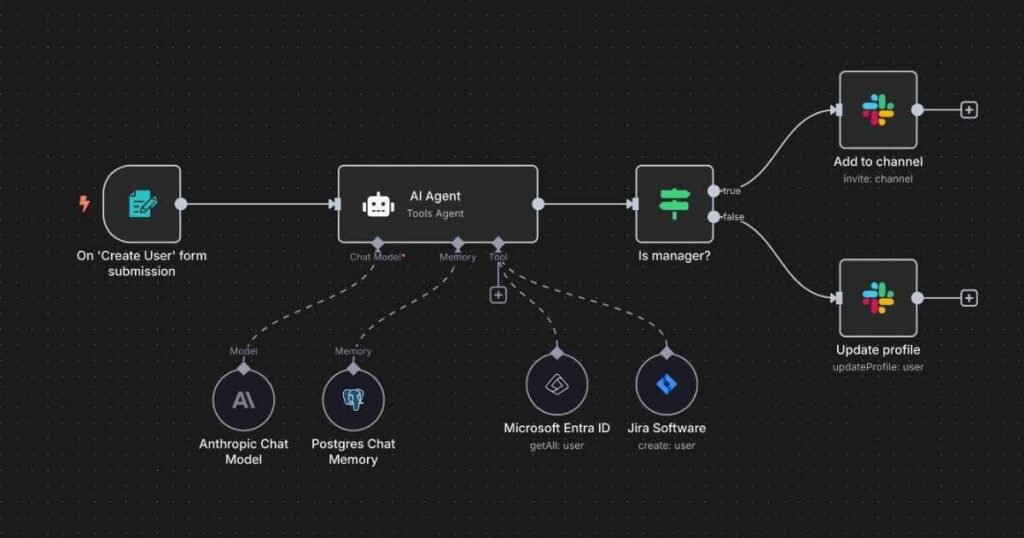
Make is a visual automation platform built for users who want more control than Zapier offers. It provides a detailed, modular interface where you can build complex workflows using filters, functions, and custom logic. Make supports HTTP webhooks, JSON parsing, and branching paths, making it ideal for advanced users. Explore their platform at make.com.
What Sets It Apart
The real power of Make lies in its precise customization. You can create multi-step flows with different outcomes, depending on the conditions you set. It’s automation without compromise.
Who Should Use It
Ideal for developers, agencies, or businesses that want advanced control without building entire applications from scratch.
Tool #3: Notion AI – Smarter Project and Content Management
Notion AI adds intelligence to the already popular workspace platform, helping users write, organize, and brainstorm faster. It offers AI-powered summaries, action item detection, automatic task generation, and idea expansion—all directly inside your Notion docs. Writers, content creators, and product teams use it to generate first drafts and manage complex information. Dive deeper by checking Notion AI.
How It Helps Organize Tasks with AI
Use it to summarize meeting notes, translate text, rephrase ideas, or create checklists from long discussions. It reduces friction in turning thoughts into structured tasks. For instance, you can see how to automate note taking and planning with Notion AI, or learn ways of summarizing notes and meetings using smart AI blocks.
Pros and Cons
- ✅ Seamlessly embedded in the Notion workspace
- ✅ Saves time on ideation and documentation
- ❌ Limited to text-based functions for now
- ❌ Still improving on accuracy and context retention
If you’re looking for practical ways to optimize your setup, explore some of the best Notion AI templates for productivity. Students and researchers can also benefit by using Notion AI to manage study notes and tasks effectively.
Tool #4: ClickUp AI – All-in-One Workflow Assistant
ClickUp is known for being a robust project management tool, but with ClickUp AI, it now includes smart task automation, auto-prioritization, content suggestions, and project summarization. It’s ideal for companies managing large teams and multiple projects. From engineering to marketing, ClickUp AI is designed to reduce busywork. Explore features on ClickUp AI.

Best Features for Teams and Solopreneurs
Teams use it to turn meeting notes into action items, auto-draft blog content, and assign tasks based on role or urgency—all inside one platform.
Pricing and Support
ClickUp AI is an add-on to their main plans and offers robust support documentation, onboarding guides, and chat-based help centers.
Tool #5: n8n – Open Source Automation with Endless Potential
n8n is an open-source workflow automation tool that gives users full control over their automation infrastructure. You can self-host it on your own server, write JavaScript functions, and integrate with dozens of services. It’s great for developers and tech-savvy businesses that prioritize data privacy and flexibility. Visit n8n.io to learn more.
When to Choose n8n Over Commercial Platforms
If you need full backend access, want to store data locally, or require complex custom logic, n8n is a perfect fit. It’s open-source freedom, with enterprise-grade power.
Technical Requirements to Know
You’ll need basic knowledge of JavaScript and access to a cloud or on-premises server. The setup takes more time than Zapier or Make but offers complete autonomy.
Comparison Table: Best Workflow AI Tools at a Glance
| Tool | Best For | AI Capabilities | Skill Level |
|---|---|---|---|
| Zapier | Non-coders | Basic automation | Beginner |
| Make | Complex workflows | Advanced automation | Intermediate–Expert |
| Notion AI | Writers & planners | AI writing & summaries | Beginner |
| ClickUp AI | Project teams | Task generation & suggestions | Intermediate |
| n8n | Developers | Custom logic & scripts | Advanced |
How to Choose the Right Tool for Your Needs
Consider your goals. If you want speed and simplicity, start with Zapier. If customization and visual control are top priorities, Make may suit your style. Need AI for writing and content? Notion AI delivers that. For all-in-one project automation, ClickUp AI is hard to beat. And if you value complete control and privacy, n8n is your open-source champion. Define your use case, skill level, and budget to make the best decision.
Real-World Examples of AI Workflow Tools in Action
A marketing team uses Zapier to capture leads from a form and instantly send a personalized welcome email. A startup founder uses ClickUp AI to turn product meeting notes into a project sprint board. A tech agency relies on Make to connect HubSpot, QuickBooks, and Google Drive into a single, fluid process. A freelance writer uses Notion AI to plan content calendars and draft outlines in seconds. Each tool makes workflows faster, smarter, and more consistent.
Common Mistakes to Avoid When Automating with AI
- Over-engineering: Don’t automate for the sake of it. Start small and scale up.
- Forgetting fail-safes: Include manual approval steps where needed—especially with payments or messaging.
- Neglecting documentation: Keep records of what each flow does. It’ll save you time troubleshooting later.
- Ignoring team training: Teach your team how to use and manage automations to reduce confusion or errors.
The Future of Workflow Automation and AI Integration
AI workflow tools are moving beyond simple automation into intelligent orchestration. Imagine tools that don’t just execute tasks—but learn from results, suggest optimizations, and even detect bottlenecks before they happen. With the rise of machine learning, real-time analytics, and conversational AI, the future will bring even more seamless, proactive, and predictive workflows. Those who invest now will ride the front of this digital transformation wave.
AI workflow tools aren’t just a productivity boost—they’re a strategic advantage. From automating simple tasks to managing complex projects, the right tool can save you time, money, and stress. Start small, experiment with features, and watch your operations evolve. Embrace the future of work one workflow at a time, and let automation carry the load while you focus on growth and innovation.